Top 10 Root Apps for Your Rooted Android Phone
10. Full!Screen
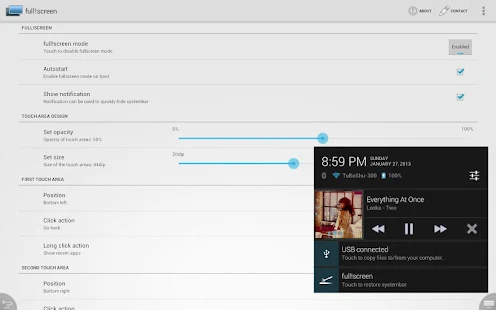
This app is a light-weight replacement/companion for the default systembar on tablets.
It can disable the bottom systembar on most tablets running Android 3 or Android 4.
Now you can use the full screen for your own apps without wasting space for the bottom bar.
» Play games,
» Watch videos,
» Surf the web,
» Read your mails...
››› everything fullscreen and without losing the main functions of the systembar:
Go back, Go to Homescreen, switch between recently used apps, access notifications...
The
provided replacement buttons can be configured in function, visibility,
position and size. Following actions can be assigned to any button:
• Go back: Navigate back within apps.
• Go to homescreen: Shortcut to directly go to homescreen.
• Show recent apps: Quickly switch between recently used apps.
• Show notifications: Display a panel with notifications.
• Restore systembar: An action to quickly restore systembar.
• Open apps menu: Easy access even to menu of older apps.
• Pie-Menu: Opens a configurable pie-menu.
The also available plus-Version supports an automatic mode:
Just
define the apps you want to use in fullscreen mode and full!screen+
takes care of the rest. It will automatically disable the bottom bar for
those apps.
- Start your browser -> *poof* bottom bar is gone.
- Switch back to Home -> the bar reappears.
- Play Video -> always in fullscreen.
You don't have to care!

9. Seeder
Lag reduction for your phones.
Many
Android tasks run slower than they should for one simple, yet
not-so-obvious reason: they consume large amounts of random data from a
limited source. Random data is used to generate session keys and unique
identifiers, in SSL and wifi, while starting processes, and during
inter-process communication.
This
data (entropy) runs out frequently, and that causes processes reading
from the blocking device (if any) to temporarily stop responding (lag).
These processes cannot continue until the Linux kernel repopulates the
entropy pool, which takes time. In addition, input events are pulled
from the user interface (to refill the pool), which may also contribute
to the problem.
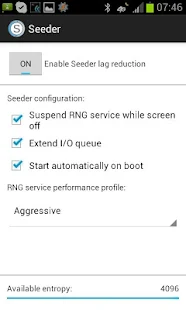
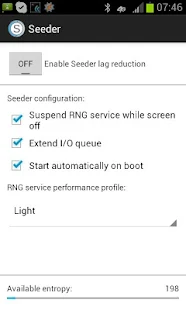
Seeder
is a service for root users. It assists the kernel in "topping off" the
entropy pool by re-seeding it with data from the non-blocking (high
performance) random device. Optionally, it can also help alleviate MMC
I/O contention by extending the I/O queue, allowing the I/O scheduler to
make better decisions, and combine more writes.
On
some devices, applications load significantly faster (particularly
large ones like Facebook, Chrome, and Youtube), and task switching
becomes effortless. Fewer visual "hiccups" occur.
This
app does not increase raw performance, but rather eliminates some types
of annoying lag (ie. applications briefly freezing, jerky scrolling,
delays returning to the home screen, etc). The effect seems to be more
noticeable the longer the device has been running prior to activating
the RNG service.
Google's
efforts to optimize newer builds of Android have been substantial, and
Seeder has less effect on Android 4.0+ (though many users still report
improvement).
8. ADB Wireless
If
you want to do some of the lower-level stuff with your Android phone,
you're going to need ADB, which stands for Android Debug Bridge --
basically a way of connecting your phone to your computer. But what if
you don't have your USB cable with you? What if you're phone is right
next to your computer, but your nearest USB cable is in your bedroom,
and you're too lazy to walk in there and grab it (or your son is asleep
right next to it and you don't want to wake him up)?
The
solution is ADB Wireless. With this app, if your phone and your
computer are on the same network, it's a cinch to use ADB. All you have
to do is open a command line on your computer and use "adb connect :5555
and you're connected to your phone via ADB just as if you were using
your coveted USB cable.
What is adb ?
Short
for Android Debug Bridge, adb is a command-line debugging application
shipped with the Android SDK. Adb provides tools to browse the device,
copy tools on the device, and forward ports for debugging.
What does Android Debug Bridge (ADB) mean?
The
Android Debug Bridge (ADB) is a client-server program used in Android
application development. The Android Debug-Bridge is part of the Android
SDK and is made up of three components: a client, a daemon, and a
server. It is used to manage either an emulator instance or an actual
Android device.
ADB Wireless Supports: adbWireless , adb shell


7. Root Explorer
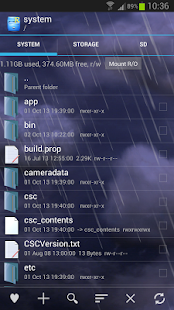
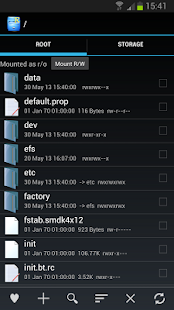
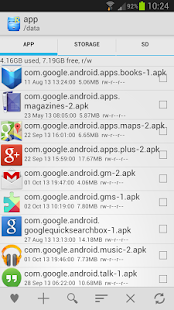
Features include multiple tabs, Google Drive, Box, Dropbox and network (SMB) support, SQLite database viewer, Text Editor, create and extract zip or tar/gzip files, extract rar archives, multi-select, execute scripts, search, remount, permissions, bookmarks, send files (via email, bluetooth etc), image thumbnails, APK binary XML viewer, change file owner/group, create symbolic link, "Open With" facility, MD5, create shortcuts.
6. ChainFire 3D Pro
Chainfire3D
is an intermediary OpenGL driver. What does that mean? It means that
Chainfire3D sits between your apps and the graphics drivers, and can
intercept and/or change commands between the two. It has some built-in
functions, and can be further extended with plugins to provide extra
functionality.
!! Android 2.1 and newer. Now available for Honeycomb - but still a big risk there !!
!! Chainfire3D is for 1ghz+ devices only !!
!! ROOT is required for this program, as well as a writable /system partition. S-OFF is also required on HTC devices !!
Features
include reducing texture size and quality to reduce memory use and
potentially increase game performance, as well as increasing memory use
potentially increase performance.
If
you also install the (experimental) EGL driver, AND your GPU supports
it, AND you have the Pro version, you can enable 4xMSAA or 16xMSAA on a
per-app bases. This can drastically improve image quality!


5. Rom Manager
ROM Manager is THE MUST HAVE APP for any Android root user. (Over 10 million downloads and counting!)
* Flash your recovery to the latest and greatest ClockworkMod recovery.
* Manage your ROMs via a handy UI.
* Organize and perform backups and restores from within Android!
* Install ROMs from your SD card.
* Install your favorite ROMs over the air!
Premium Version:
* Incremental update zips (save your data plan!)
* Premium ROMs
* Receive notifications for when your ROM is updated!
* Automatic backups
* Install Queue
* Web Connect
* Backup Download Server lets you easily transfer backups as flashable zips to your computer.
Do
you prefer using only recovery manually? Check out the Touch Recovery
in app purchase, for the most advanced recovery available!
Why does ROM Manager ask for account permissions?
Web
Connect only needs to access your Google account to connect it to your
google account. It can't access any private data or passwords.
ClockworkMod Touch Recovery:
ClockworkMod Touch recovery (and recovery) is work that needs to put in for every new device that is released by a manufacturer.
If
work on ROM Manager ceased completely, all the premium features would
continue working without issue. However, new recoveries do not port and
build themselves.


4. Superuser
Grant and manage Superuser rights for your phone.
This app requires that you already have root, or a custom recovery image to work.
Note: App and binary will have different versions. The app is updated more often than the binary is.
This
app cannot be uninstalled if it was installed with your ROM or root. If
there is no uninstall option, it's because you placed it in
/system/app, not me. It is impossible for an app to be installed in
/system/app by the Play store. In fact, the entire /system partition is
read only at runtime. The only way for an app to be placed in
/system/app is via a rooting process (which usually installs Superuser),
or by remounting the system partition as read/write and manually
putting it there.
Permissions requested are for:
Internet - updating the binary
External storage - backup/restore for elite users
NFC - creating an allow tag for elite users
Boot completed - fix database on boot
Support
request emails that simply say "Doesn't work" or something to that
effect are automatically deleted by our stupidity filter and will not be
answered.


3. Nandroid Manager
So what is Nandroid Manager? Well Nandroid Manager is the ultimate tool for managing all of your nandroid backups!
With Nandroid Manager you can restore data from your nandroid such as apps+data, text messages, call logs, and much more!
Also
with Nandroid Manager not only can you restore data from your nandroid
backups but you can also flash new recoveries and use tools like fix
permissions.
Nandroid Manager currently supports nandroid backups created by TWRP and Clockworkmod (v5.xx and v6.xx) based recoveries!
THIS APP REQUIRES THAT YOUR DEVICE IS ROOTED AND YOU HAVE BUSYBOX INSTALLED!
Current Features:
* View basic info about your nandroid backups.
* Explore contents of nandroid backup.
* Extract files from nandroid backups.
* Support for yaffs2.
* Rename backup.
* Compress backup to zip.
* Delete backup.
* Verify and regenerate MD5 hashes for backups.
* Restore Apps+Data from backup.
* Restore Text Messages from backup.
* Restore Call Logs from backup.
* Restore WiFi Access Points from backup (Pro).
* Restore Bluetooth Data from backup (Pro).
* Restore User Word Dictionary from backup (Pro).
* Restore Browser Data from backup (Pro).
* Restore Nandroid Backup.
* Flash new recovery.
* Fix permissions tool.


2. Greenify
Never
should your phone or tablet become slower and battery hungrier after
lots of apps installed. With Greenify, your device can run almost as
smoothly and lastingly as it did the first day you had it!
Featured
as Lifehacker's Top 1 Utility in 2013 Best Android Apps
(http://goo.gl/1VMwnE), Android Authority's Top 3 Best Root Apps
(http://goo.gl/g0L0qZ).
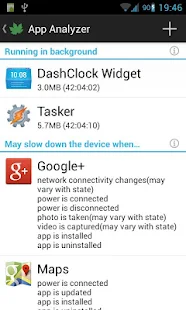
Greenify
help you identify and put the misbehaving apps into hibernation when
you are not using them, to stop them from lagging your device and
leeching the battery, in an unique way! They can do nothing without
explicit launch by you or other apps, while still preserving full
functionality when running in foreground, similar to iOS apps!
NEVER
greenify alarm clock apps, instant messaging apps unless you don't rely
on them. Please do verify the impact of greenified apps on which you
heavily rely.
Compared to other popular tools aimed for the similar purpose, Greenify offers the following advantages:
◆
Unlike the "Freeze" feature in "TitaniumBackup Pro" that totally
disable the app, you can still use your app as usual, share content with
it. No need to freeze & defrozen it.
◆
Unlike "App Quarantine", you can launch greenified apps in any way as
usual. No more crafted app-launch widgets, no more manual disabling.
◆
Unlike "Autostarts", you can benefit from almost all of its advantages,
without needing to deal with the complexity and risk of obscure app
components, and never lose functionality when app is actively running.
◆
Unlike any "XXX Task Killer", your device will never fall into the
cat-mouse-game of stealthy-running and aggressive killing, which
unnecessarily consumes more battery juice.
Note:
Greenify do need a background persistent "Cleaner" service to put the
greenified apps back into hibernation when you are not actively using
them. It is designed and implemented in extremely lightweight, with an
average RAM footprint at 3M in total, and nearly zero CPU and battery
consumption.
In case you cannot install from Play store: http://oasisfeng.com/Greenify.apk
=== PERMISSIONS ===
INTERNET:
Needed by "Raise Your Voice" program to send back only small amount of
anonymous statistics data, without privacy information. You can opt-out
at any time.
READ SENSITIVE LOG: To analysis the wake up cause of greenified apps.
GET ACCOUNTS & WRITE SYNC SETTINGS: Control the account sync of apps if its sync task is too frequent.

1. Titanium Backup
Titanium Backup is the most powerful backup tool on Android, and then some.
You
can backup, restore, freeze (with Pro) your apps + data + Market links.
This includes all protected apps & system apps, plus external data
on your SD card. You can do 0-click batch & scheduled backups.
Backups will operate without closing any apps (with Pro). You can move
any app (or app data) to/from the SD card. You can browse any app's data
and even query the Market to see detailed information about the app.
Also see the paid PRO key which adds EVEN MORE awesome features such as:
[✔] 0-click batch restores
[✔] Keep multiple backups per app
[✔] Backup/restore SMS,MMS,calls,bookmarks,Wi-Fi AP as XML
[✔] Multi-user app data
[✔] Apps freezer
[✔] Sync to/from Dropbox (manual/scheduled)
[✔] Sync to/from Box (manual/scheduled)
[✔] Sync to/from Google Drive (manual/scheduled)
[✔] TB Web Server: download/upload your backups as a single ZIP on your computer
[✔] Convert user apps <=> system apps
[✔] Integrate system app updates into ROM
[✔] Encryption
[✔] Market Doctor (relink apps to Market)
[✔] "Destroy all Market links" feature
[✔] Hypershell speed
[✔] Backup apps without closing them!
[✔] Create your own update.zip containing apps+data!
[✔] Restore individual apps+data from non-root ADB backups!
[✔] Restore individual apps+data from CWM backups!
[✔] Restore individual apps+data from TWRP backups!
[✔] Market "auto updating" manager
[✔] Dalvik cache cleaner
[✔] Integrate Dalvik cache system elements into ROM
[✔] Unlimited schedules
[✔] Load/Save a Filter and use it in Widgets/Schedules
[✔] Change the device's Android ID, restore it from a backup or after a factory reset
[✔] Protect backup against deletion
[✔] Send backup (to e-mail/cloud) and import it in 1 click
[✔] Backup→Verify→Un-install an app in one shot
[✔] Freeze/defrost/launch apps in a single click
[✔] CSV export any app DB (e-mail or Google Docs)
[✔] Convert app data to/from fast WAL format


0 comments:
Post a Comment